You can also choose to deploy XQv Recording on-premises.
XQTING delivers XQv Recording as 2 docker containers.
For an on-premises installation, we recommended to install 2 servers, physical or virtual:
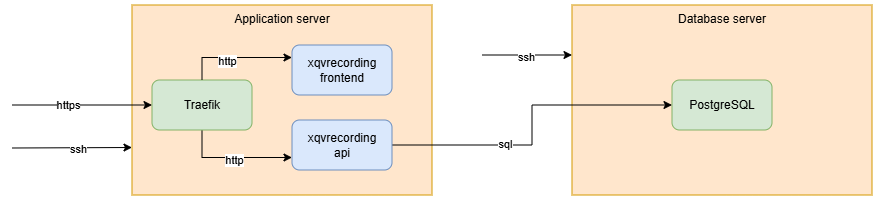
¶ Application server
- Debian OS (latest LTS version)
- start with at least 2 vCPU and 2 GB RAM
closely monitor the resource usage and upgrade when required - at least 20GB disk space
- extra required disk size = 3,2 MB per minute recording
- with docker engine installed to run the following containers:
- https://hub.docker.com/hardened-images/catalog/dhi/traefik
as reverse proxy, automatically manages https certificate - https://xqting.azurecr.io/xqting/xqvrecording-frontend
docker image and configuration files delivered by XQTING - https://xqting.azurecr.io/xqting/xqvrecording-api
docker image and configuration files delivered by XQTING
- https://hub.docker.com/hardened-images/catalog/dhi/traefik
- XQTING can deliver a working docker compose file
- with sshd daemon
- access via public keys instead of passwords
- the audio files can be stored on NFS
- required public inbound network connections
- https
- access from the PBX: recording URL + websocket connection
- access from the browsers of the supervisors/administrators
- ssh
for installation, configuration and maintenance
- https
- required outbound network connections
- https://xqting.azurecr.io and https://hub.docker.com
only during installation and upgrades to download docker images
- https://xqting.azurecr.io and https://hub.docker.com
¶ Database server
- Debian OS (latest LTS version)
- start with at least 2 vCPU and 2 GB RAM
closely monitor the resource usage and upgrade when required - at least 20GB disk space
- with docker engine installed to run the following container:
- https://hub.docker.com/hardened-images/catalog/dhi/postgres
- use docker volumes or mounted disks to avoid the database is lost when the container restarts
- configuration manual: https://docs.docker.com/guides/postgresql/ with correct PostgreSQL tuning (shared_buffers, etc.)
- XQTING can deliver a working docker compose file
- configure automated regular database backups
- monitor disk I/O and latency
- avoid a network filesystem to store the database files, since this introduces extra latency
- required inbound network connection
- PostgreSQL (default port 5432)
Should not be publicly available, only accessible from the database server - ssh
for installation, configuration and maintenance
- PostgreSQL (default port 5432)
- required outbound network connections
- https://hub.docker.com
only during installation and upgrades to download docker images
- https://hub.docker.com
¶ General remarks
- both servers must be connected with at least a 1 Gbps network
- the virtualization software must be properly configured
- IP whitelisting can be used as an extra security measure