¶ XQv Recording and innovaphone
¶ Concept
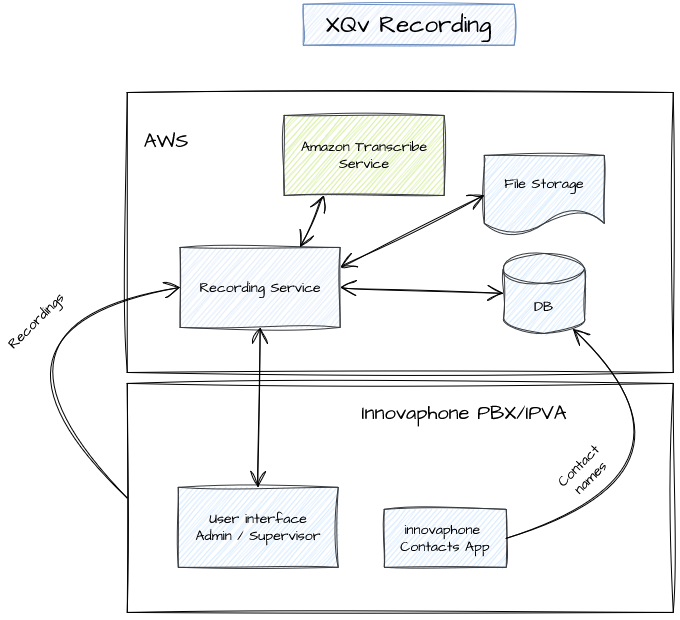
This architecture applies when XQv Recording is used in combination with an innovaphone PBX or IPVA.
The core of the solution runs in Amazon Web Services. As an alternative XQv Recording can run in your own hosting environment (in that case, the recording engine cannot use Amazon Transcribe – the service we use to convert the .wav files to text).
The recording service automatically captures recordings from the users that were configured as to be recorded in innovaphone.
Meta data is stored in the database. This includes, amongst other things: the date and time of the call, duration, extension, user, caller’s number, contact name, tags and notes. The contact’s name is looked up in the innovaphone Contacts App.
Recordings are stored in an S3 bucket, until they are removed automatically after a configurable number of months (e.g. 1 month for training purposes).
The User Interface for the administrator and supervisor is launched as an app from within innovaphone, and interacts with the core module.
¶ Apps and licenses
When using XQv Recording in combination with an innovaphone PBX (on premise or in the cloud), the access to the application is governed by the combination of
- the rights to access apps in innovaphone MyApps and
- the innovaphone license mechanism
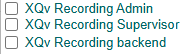
XQv Recording consists of 3 “apps” out of which 2 are of importance here:
- XQv Recording Admin: determines whether someone is granted access to the XQv Recording administrator interface; no licence is required for this
- XQv Recording Supervisor: determines whether someone is granted access to the XQv Recording supervisor interface; this also requires a licence
To allow users to access one of the apps, check the app name in:
innovaphone > PBX > objects > user (show) > Apps tab
Two types of licenses are defined, one for the agents, and one for the supervisors of a team. The administrator does not require a license as stated above.
- App(xqting-xqvagent): such license is required for each agent that you want to be recorded (runs in the background, does not need access to an app)
- App(xqting-xqvsupervisor): license that grants access to the XQv Recording supervisor interface (don't forget to grant access to the app - refer above)
When you purchase or rent these licences, you can assign them to users. This is done in the innovaphone user configuration. As an alternative, you can assign the license to an innovaphone template. A user that is based on this template inherits the license.
innovaphone > PBX > objects > user (show) > License tab:
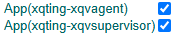
A user for which the xqting-xqvagent license is switched on will automatically be recorded.
A user for which the xqting-xqvsupervisor licenses is switched on has automatically access to the supervisor interface. Automatically means that once logged on into the innovaphone app environment, the user can just click the XQv Recording icon upon which he receives immediate access.
¶ In practice
As an administrator of the innovaphone PBX you can load the license files and
- Define an administrator for the XQv Recording app by turning on the “XQv Recording Admin” switch for this user in his Apps tab
- Define one or more supervisors by
- turning on the “XQv Recording Supervisor” switch for this user in his Apps tab
- turning on the “App(xqting-xqvsupervisor)" switch for this user in his License tab
- Decide which agents need to be recorder by turning on the “App(xqting-xqvagent)” switch on for all these users